A paused workload has no pods, so nothing answers its Service. The first request wakes it. The doorman holds the connection until a pod is Ready, then passes it through. The caller usually sees one slow response (the exceptions).
On a public URL, the doorman can ask before waking instead. Then only a person’s click wakes it.
- Default
- On for every workload Napwake pauses on its own, with nothing to configure
- On a public URL
ask: a browser gets a Wake it button, and robots wake nothing- Protocols
- Any TCP, such as HTTP, gRPC, Postgres and Redis
- Holds a request
- Up to
wake.maxWait, 2 minutes by default - Browsers
- A waking-up page that reloads every 3 seconds
How it works
Section titled “How it works”The doorman is a small proxy, its own Deployment beside the operator, with two replicas and a PodDisruptionBudget.
- Asleep · paused
Routed to the doorman
Its Services point at the doorman.
- A caller connects and sends something
- Waking up · resuming
Held, and woken
The doorman holds the connection and wakes the workload.
- A pod is Ready
- Awake · running
Passed through
A Ready pod gets the connection.
| When | What happens |
|---|---|
| The workload starts to pause | The operator adds an EndpointSlice, one per IP family, to each Service that selects its pods. It points at the doorman, on a port of its own (20000-29999). The Service, ClusterIP and DNS name don’t change, so callers and Ingresses need no changes. IPv4, IPv6 and dual-stack all work. The slice is in place before the pods stop, so no request is refused as they do (What happens in a pause) |
| A connection arrives | If a pod of the Service is already Ready, it goes straight there. That happens while it’s still pausing or already waking, or when another workload’s pods serve the Service. While it’s pausing, a request passed on that would wake it calls the pause off. Otherwise the doorman waits for the caller to send something |
| The caller sends something | The doorman holds the connection and sets napwake.dev/last-request on the ManagedWorkload, which wakes it like an activity annotation. A WokenByRequest event names the Service. Once Running, the clock shows lastActivitySource: request |
| A pod is Ready | The doorman, watching the Service’s own EndpointSlices, passes the held connection to a Ready pod, with the bytes already sent |
The workload is Running |
The operator removes the doorman’s EndpointSlices. For 30 seconds the doorman still passes stray connections to Ready pods, waking nothing, while kube-proxy and load balancers catch up |
The doorman works on TCP connections, not HTTP requests. Waking a workload wakes its dependencies too. Ingress controllers, Gateway API implementations and cloud load balancers that read EndpointSlices reach the doorman the same way (the ones checked). A routed workload reports this:
WakeOnRequest=True DoormanRouted requests are held and wake the workloadReadiness probes
Section titled “Readiness probes”The doorman lets a held request through once a pod is Ready. Ready comes from the readiness probe. Without one, a pod is Ready when its containers start, often before the app can serve. The request then gets whatever the app answers, such as a 503. Give the app a probe that passes only once it can serve. If the app isn’t listening yet, the doorman retries every second until maxWait.
spec: template: spec: containers: - name: api readinessProbe: httpGet: path: /ready # answers 200 only once the app can serve requests port: 8080 periodSeconds: 2| Probe | Effect |
|---|---|
A short periodSeconds |
Passes held requests on sooner |
A startupProbe |
Gates readiness too |
A tcpSocket probe on the app’s port |
Enough for an app that listens only once it’s ready |
| None in any container, and no readiness gates | Napwake reads the pod template when it routes the workload. The WakeOnRequest condition says so, and a NoReadinessProbe warning event points here, once each pause |
What wakes a workload, and what doesn’t
Section titled “What wakes a workload, and what doesn’t”| The caller | What happens |
|---|---|
| Sends bytes, such as an HTTP request, a TLS handshake or a database protocol’s first message | Held. It wakes |
| Connects, then sends nothing for 3 seconds | Held. It wakes, taken for a protocol where the server speaks first, such as MySQL |
| Connects and closes without sending, like a TCP health check | Closed |
GET or HEAD from a known probe, scraper or uptime monitor, by User-Agent (below) |
503 Service Unavailable, Connection: close. These would otherwise keep it awake forever |
GET or HEAD from Google Cloud’s load balancer health check, GoogleHC/ |
200 OK. Google’s load balancers send nothing to a backend that fails its check, so they’d drop the request that should wake it |
GET or HEAD from a prefix you added in the Helm value doorman.healthCheckUserAgents |
503 |
Any other method from those agents, such as a Prometheus remote write or an Alertmanager POST |
Held. It wakes, since that’s data for it |
A hidden file, whose path has a part that starts with a dot, such as /.env, /.git/config or /.aws/credentials, except under /.well-known/ |
404 Not Found. No app serves these to its users, and scanners hunt them for leaked secrets |
Checkers get these answers only while no pod is Ready. Then they pass through.
The User-Agents the doorman knows
| Prefixes | |
|---|---|
| Built in | kube-probe/, Prometheus/, Blackbox Exporter/, vm_promscrape, GrafanaAgent/, Alloy/, OpenTelemetry Collector, otelcol, Datadog Agent/, Datadog/Synthetics, ELB-HealthChecker/, Amazon-Route53-Health-Check-Service, GoogleStackdriverMonitoring-UptimeChecks, Envoy/HC, Mozilla/5.0+(compatible; UptimeRobot/, Pingdom.com_bot, NewRelicPinger/, Uptime-Kuma/, Gatus/ |
| Yours | Each one in doorman.healthCheckUserAgents |
After (compatible; |
Any of them, built in or added, as in Mozilla/5.0 (compatible; MyCorpMonitor/3.1) from a monitor posing as a browser |
Add your own checkers’ prefixes, cluster-wide:
doorman: healthCheckUserAgents: ["MyCorpMonitor/", "status-checker"]To keep the doorman off a port, list it on the Service by name or number. A metrics port something else scrapes is an example. Listed ports are never routed, so they fail while the workload is paused.
kind: Servicemetadata: annotations: napwake.dev/doorman-ignore-ports: "metrics" # or "9090", or both: "metrics,9090"spec: ports: - name: http port: 80 - name: metrics port: 9090Health checks the doorman can’t recognise
Section titled “Health checks the doorman can’t recognise”The doorman knows a health check only by reading it. Two kinds can’t be read, and wake a paused workload on its traffic port every time they run. So it never stays paused longer than their interval.
| Check | Why it can’t be read |
|---|---|
| HTTPS and other TLS checks | The User-Agent is encrypted. AWS target groups that use HTTPS check over HTTPS by default, as do Google Cloud backend services on HTTPS or HTTP/2 |
HTTP checks and scrapers with a User-Agent the doorman doesn’t know |
It looks like a caller, as from an uptime monitor you haven’t added to doorman.healthCheckUserAgents |
napwake.dev/doorman-ignore-ports can’t help on the traffic port, since ignoring it would stop requests waking the workload too. Do one of these instead:
| Fix | What to know |
|---|---|
| Check over plain HTTP | AWS’s and Google’s checkers send a User-Agent the doorman knows, and get 503 and 200, waking nothing |
Check a port served only for health checks, listed in napwake.dev/doorman-ignore-ports |
Not behind a GKE Ingress or Gateway. Nothing answers that port while the workload is paused, so Google’s load balancer sees no healthy backend and sends nothing on |
Most load balancers see a paused workload as unhealthy, as they would without Napwake. Then they do this:
| Load balancer | With every target unhealthy |
|---|---|
| AWS Application and Network Load Balancers | Fail open. The first request reaches the doorman and wakes the workload |
| Google Cloud Application Load Balancers, behind a GKE Ingress or Gateway | Answer 502 and send nothing on, until a backend passes its check. So the doorman answers GoogleHC/ with 200 OK, waking nothing, and holds the request that follows |
| Any other | Check it before relying on wake on request behind it |
Environments on the public internet
Section titled “Environments on the public internet”On the public internet, have the doorman ask before waking, with napwake.dev/wake: "ask". A browser then gets a Wake it button, and robots wake nothing. Public preview environments walks through it.
| The environment | wake |
A request while it’s paused |
|---|---|---|
| Behind a VPN or single sign-on at the ingress, or an allowlist of your offices’ and VPN’s addresses | request, the default |
Held while the workload wakes |
| Anyone can reach it | ask |
A browser gets a Wake it button. Anything else gets a 503 |
With request, the doorman wakes for any request it can’t tell is a health check. On the public internet most are robots. They’re search engine crawlers, and scanners that try every address for known weaknesses.
Many send a browser’s User-Agent on purpose, so no list keeps up. Once an environment has an HTTPS certificate, its hostname is in public certificate logs within minutes. Scanners then reach it by name.
A paused workload anyone can reach would wake every few minutes, and free little. request turns away only the hidden-file scanners.
With ask, it still wakes in other ways. Tooling sets the wake annotation, as kubectl napwake wake does, whatever the wake setting. Behind the doorman, the forecast learns from people’s wakes, and with autoResume has it up before they come.
It also wakes from CI through an activity annotation, when a dependent wakes, or when something else scales it up. A Prometheus activity query that counts ingress requests counts crawlers’ requests too, so it would let them wake it. Don’t count requests there, or filter bots out.
Services shared with other workloads
Section titled “Services shared with other workloads”A Service goes to the doorman only while none of its pods is Ready.
| Behind one Service | What happens |
|---|---|
| Another workload’s pods are Ready, as with a canary beside a stable Deployment | Traffic goes to them. A paused workload reports WakeOnRequest=False, reason ServedByOtherPods |
| Every workload is paused | The Service is routed, and a request wakes them |
| The other pods all go | The Service is routed within 30 seconds, and until then requests to it fail. The operator doesn’t cache other workloads’ endpoints. It reads the Service’s EndpointSlices from the API server, and decides again every 30 seconds while other pods serve it |
Asking before waking
Section titled “Asking before waking”spec: wake: mode: Ask # the default is Request, any request wakes itThe doorman then wakes the workload only when a person asks. Crawlers, scanners and API clients still reach the doorman, and nothing they send wakes it. With the label, set napwake.dev/wake: "ask" on the workload or its namespace.
For the cluster, set defaults.wake: ask (The wake setting). Public preview environments walks through it.
wake.mode |
A browser opening a page, while it’s paused | Any other caller |
|---|---|---|
Request, the default |
Wakes it, and gets the waking-up page | Held while it wakes, unless it’s a known probe |
Ask |
Gets the asleep page. Only a click on Wake it wakes it | Gets a 503, and wakes nothing |
WakeOnRequest says the doorman asks:
WakeOnRequest=True DoormanRouted the doorman asks a person's browser before waking the workload, and turns away other requestsWhat browsers, robots and API clients see
Section titled “What browsers, robots and API clients see”| The caller | What happens |
|---|---|
| A person’s browser opening a page | The asleep page, with a Wake it button |
| A click on Wake it, from a browser that says it came from the page | Wakes it, as a held request does. The waking-up page follows |
| A click whose button has run out, as on a page left open while its reloads failed | The asleep page again, a 403, saying nothing woke, as the page may have been open too long, with a fresh button |
A click the browser says came from a page at another address. That’s another site or subdomain. Or, over plain HTTP, an Origin that isn’t the page’s, as behind a proxy that rewrites Host |
The asleep page again, a 403, saying the click came from another address. It says someone with access to the cluster can wake it with kubectl napwake wake |
| A click within a minute of the last wake request | The asleep page again, a 429 with Retry-After: 60, saying to try again in a minute |
| A click from a browser that doesn’t say it came from the page, one from before about 2020 | The asleep page again, saying so. It says to use a current browser, or that someone with access to the cluster can wake it with kubectl napwake wake |
| A browser posting a form that isn’t the button’s, such as the app’s login after the pause | The asleep page, a 200, as for a page load. It isn’t counted as turned away |
| Anything else | 503 Service Unavailable with Retry-After: 300, and a short body saying it’s asleep and how to wake it |
| A connection that isn’t HTTP, such as a database protocol, or TLS the doorman can’t read | Closed, with nothing sent |
| A known probe, health check or hidden file | Answered as for any workload (above) |
| Anything, once the workload is waking | As with Request. A browser gets the waking-up page, and the rest is held until it’s Ready |
How the doorman tells them apart
| How | |
|---|---|
| A person’s browser opening a page | A GET with Sec-Fetch-Mode: navigate, or asking for HTML, from a User-Agent that starts with Mozilla/ and names no crawler |
| The asleep page | A 200 with Cache-Control: no-store, X-Robots-Tag: noindex and Referrer-Policy: same-origin. It reloads every minute |
The asleep page’s Content-Security-Policy |
Allows its own style and script, and images only from data:. Its form posts only back to the page’s address. No other site may show it in a frame, which X-Frame-Options: DENY says too |
| A tab left open | Its reload goes on to the app once someone has woken it |
| The click | Stamps napwake.dev/last-request, and a WokenByRequest event says a person asked. The waking-up page reloads the page the person opened until the app answers |
| A form that isn’t the button’s | URL-encoded and up to 1 KiB, or sent on chunked by a proxy |
| Anything else | curl, scripts and API clients, crawlers and link previewers such as Googlebot and facebookexternalhit, headless browsers, scanners, a HEAD, a WebSocket, a browser’s fetch, a larger form or a file upload |
The 503’s body |
JSON for a client that asks for it, and plain text otherwise |
A robot that passes for a browser gets the page, and wakes nothing either. Only a post of the page’s token wakes the workload. It must be fresh, and from a browser’s User-Agent that says the click came from the page:
| Where | The browser says so with |
|---|---|
| It sends fetch metadata, as current browsers do over HTTPS | Sec-Fetch-Site: same-origin, a page of the same scheme, host and port |
| The same, from Chrome, Edge, Firefox and other Chromium browsers | Sec-Fetch-User: ?1 too, which marks a navigation a person started. Safari, and every browser on iOS, never send it, so their clicks are judged by the rest |
| It doesn’t, as no browser does over plain HTTP | An Origin that’s the address the page was served at. That’s the host its request named, shown at the top of the page, and its port |
Over plain HTTP, behind a proxy that rewrites the Host header |
The two differ. Serve the workload over HTTPS there |
The page’s Referrer-Policy: same-origin lets the browser send that Origin, and sends nothing to other sites. So a spider that fetches the page and posts its token wakes nothing, even with a browser’s User-Agent. Nor does a script that submits the form.
A robot that forges those headers on purpose, or drives a real browser and clicks, still can. That’s rare, and costs at most a wake a minute. A browser from before about 2020 may send neither.
Its click can’t be told from a spider’s, so it wakes nothing. The page says so. It says to use a current browser, or that someone with access to the cluster can wake it with kubectl napwake wake.
The pages name no namespace, workload or Service, so they give nothing away to whoever reaches them.
The Wake it button
Section titled “The Wake it button”The button posts back to the address of the page the person opened. So it reaches the same workload however an ingress routes it, a path prefix included.
| The button’s token | |
|---|---|
| Signed for | That workload and that pause, named by when the pause began (status.pause.startedAt). It wakes no other, nor the same one in a later pause |
| Good for | 10 minutes |
| On a page shown as the workload pauses | It’s for that pause. Its click calls the pause off, or wakes the workload once it’s paused |
| Kept fresh | By the page reloading every minute. That also takes a tab left open on to the app once someone has woken it |
| Expired anyway, as on a page whose reloads failed | Wakes nothing. The page says so, as a 403, and offers the button again |
| Posted from a page of another site, subdomain or port | Wakes nothing, as Sec-Fetch-Site or the Origin says. The page says how else to wake it |
| Shown in a frame | No other site can show the page in a frame |
The doorman’s replicas sign with one key, since a click can reach any of them. It’s in a Secret the chart creates empty, napwake-doorman-wake-key for a release named napwake.
The first doorman pod to find it empty fills it with a random key. Helm and GitOps tools never set its data, so they leave the key alone.
To change the key, empty the Secret. Each doorman pod uses the new one within a minute. It stops accepting the old one 11 minutes after it switches, once every token signed with it has expired.
kubectl patch secret napwake-doorman-wake-key -n napwake-system --type=json -p '[{"op":"remove","path":"/data"}]'A click wakes a workload at most once a minute, whichever doorman pod it reaches. A click within a minute of the last wake request gets a 429, with Retry-After: 60. It asks to try again in a minute. That can be one moments before the workload paused again.
People’s tooling can wake it too, without a browser. A pull request bot, a developer portal or a chat command sets napwake.dev/wake-requested, as kubectl napwake wake does. Both work whatever wake.mode says.
What it turns away
Section titled “What it turns away”The doorman counts the requests it turns away during each pause. That’s the 503s and closed connections, not a person shown the page, nor probes and health checks. It’s a count only, with nothing of the requests themselves, no paths, addresses or headers.
It’s in the ManagedWorkload’s status, brought up to date about once a minute. It covers the current pause, or the last one once the workload is awake.
status: turnedAway: pausedAt: "2026-10-23T18:04:12Z" requests: 312kubectl napwake status lists the workloads that turned requests away. napwake_doorman_wakes_total{result="turned_away"} counts them as they happen (Metrics). Many mean something automated calls the workload, such as a monitor, a webhook or another service. A person can’t be turned away, so find out what it is.
When to keep waking on request
Section titled “When to keep waking on request”Asking suits what people open in a browser. Keep Request, the default, for a workload that other workloads, scripts or webhooks call. They’re turned away while it’s paused, and nothing they send wakes it.
| Asking needs | What that means |
|---|---|
| Plain HTTP/1.1 to the doorman | TLS ended at an ingress or load balancer in front of it. They speak HTTP/1.1 to their backends unless told otherwise |
| Fine | A browser’s HTTP/2 or HTTP/3 to the ingress, and a click’s form sent on chunked |
| Never woken by a click | A workload that ends TLS itself |
| Turned away | A proxy told to speak HTTP/2 or gRPC to it, such as ingress-nginx with backend-protocol: GRPC |
A workload that asks never pauses early, even with pauseEarly on. A request doesn’t wake it, so someone who came while the forecast expected quiet would find it asleep. It pauses when idleAfter runs out.
Browsers
Section titled “Browsers”A browser gets a page at once, saying the environment is starting. The page reloads every 3 seconds, and the first reload after a pod is Ready reaches the app. With Ask, a browser gets the asleep page first, and this one after the click.
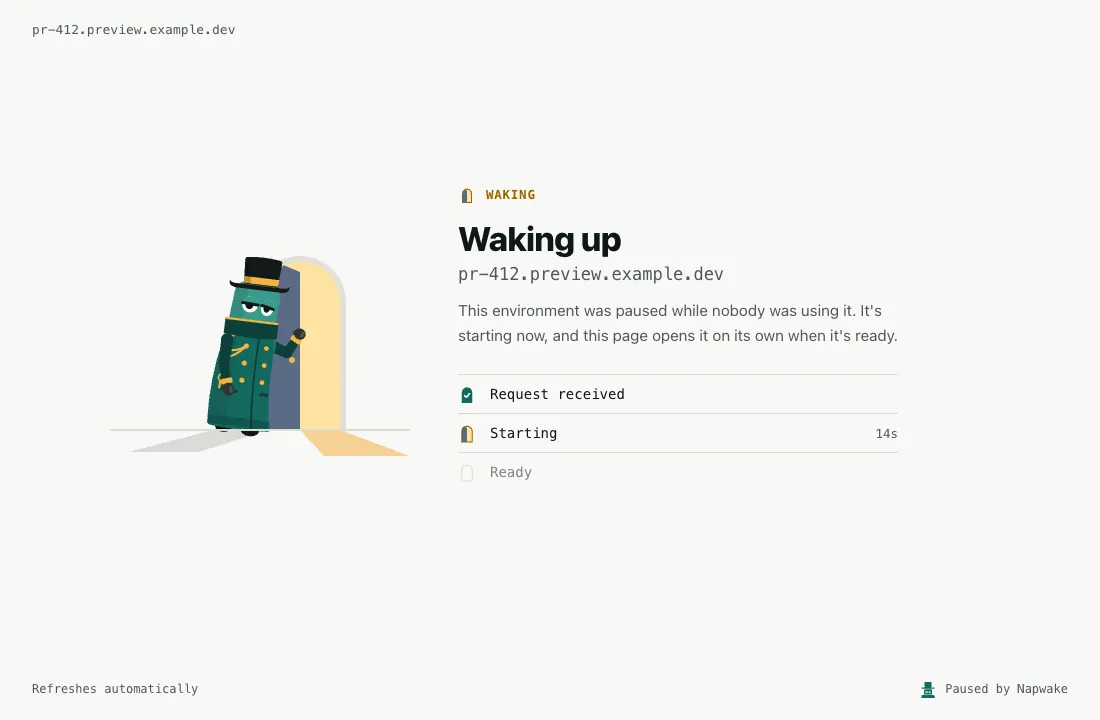
| The waking-up page | |
|---|---|
| Shows | The address the person opened, so it reads as part of their environment. Once the workload is Resuming, how long it has been starting. It names no namespace, workload or Service |
| Goes to | A browser opening a page, by a GET or HEAD with Sec-Fetch-Mode: navigate, or one that asks for HTML, from older browsers. Scripts’ requests, API clients, form posts, WebSockets, TLS and other protocols are held as usual |
| Tells callers apart | By the first bytes they send, which the doorman passes on unchanged when it holds the connection. It reads up to 16 KiB of headers. Large single sign-on cookies can make them longer. Then the first 16 KiB decide, and browsers send those before their cookies |
| Is sent as | 503 Service Unavailable with Cache-Control: no-store, Retry-After: 3 and X-Robots-Tag: noindex, so caches, crawlers and monitors don’t take it for the app. It answers at once, so proxy timeouts don’t matter for browsers |
| Its tab icon | Drawn in the page, so browsers don’t ask the doorman for /favicon.ico |
Its Content-Security-Policy |
Allows its own style and no script, and images only from data: |
| Can be missed | A browser reaches the doorman only when it asks the server. A page served without Cache-Control, as static file servers often do, can reload from the browser’s cache. Apps that send Cache-Control: no-cache for their HTML, as most do so releases take effect, always reach the doorman |
To hold browsers like any other caller, set this. With the label, set the annotation napwake.dev/wake-page: "false" instead. With Ask, a browser always gets a page.
spec: wake: page: falseHow long a connection is held
Section titled “How long a connection is held”The doorman holds a connection for up to wake.maxWait. That’s 2 minutes by default, and at most 1 hour, the most the ManagedWorkload accepts. With no Ready pod by then, it closes the connection. The wake carries on, so a retry a little later succeeds. With the label, set the annotation napwake.dev/wake-max-wait: "5m" instead.
spec: wake: maxWait: 5m # a slow starter, such as a database replaying its logCallers time out too. Most HTTP clients wait at least 30 seconds, and browsers minutes. A proxy can give up sooner, and ingress-nginx closes an upstream request after 60 seconds by default. For a slower starter, raise it to match maxWait:
metadata: annotations: nginx.ingress.kubernetes.io/proxy-read-timeout: "120"Limits
Section titled “Limits”The caps stop a flood of connections exhausting the doorman, or waking workloads faster than the cluster can start them.
| What | Cap | Over the cap |
|---|---|---|
| Connections held, per doorman pod | 2048. Per workload 256, per source IP 1024, per source IP for one workload 128 | Closed at once, with nothing sent |
| Passed through at once, per doorman pod | 1024. Per source IP 512 | Held as if the workload weren’t Ready, until a place frees or maxWait runs out |
Clicks on Wake it, with Ask |
One wake a minute per workload, whichever doorman pod a click reaches | The asleep page, a 429, asking to try again in a minute |
| Wakes | Per source IP, a burst of 30, then one every 2 seconds. Overall, a burst of 200, then 10 a second. Only a request that would wake a paused workload counts, and one refused overall doesn’t use its source’s allowance | Browsers get the waking-up page, and the rest are held. The wake is retried every 2 seconds until allowed or maxWait runs out |
| Bytes read from held callers | 1MiB per connection, 32MiB in all, each connection’s first 8KiB not counted | A larger body waits in the network until the workload is up, or other held connections free some of the 32MiB |
| A passed-through connection that carries nothing either way | 10 minutes | Closed, so a vanished caller frees its place. Pings keep it open, as with WebSockets and database pools |
| Connections still passing through the doorman once the workload is awake and its route drains | 5 minutes | Closed, so long-lived callers reconnect to the pods directly |
The doorman reads what held callers send, so it can let go at once of one who gives up. The uncounted 8KiB keeps that working for ordinary requests while uploads fill the 32MiB. A caller who leaves partway through a larger body is let go once it’s read.
A caller that closes its connection has left, whatever its protocol, and is never passed on. Over TCP, closing and shutting only the sending side look the same, and nearly every caller that does either has given up. So a client that sends, then shuts its side to wait, as nc -N does, is dropped while the workload is paused. Leave the connection open instead.
The caps are per workload as well as per source, since the source IP is the address the doorman sees. Through an ingress controller, that’s the controller’s pod, shared by every user behind it. A burst to one environment then can’t crowd out the rest. The per-workload cap also stops one that never becomes Ready from taking every place.
When a doorman pod stops, and when a route is removed
| When | What happens |
|---|---|
| A doorman pod shuts down | It reports itself not Ready at once. The operator moves paused workloads’ EndpointSlices to the other doorman pods, rewriting only their endpoints, many at once. A thousand paused Services move in about ten seconds |
| A rollout of the doorman | Each new pod starts, and 5 seconds after it’s Ready an old one stops |
| The operator is upgraded or restarted at the same time | Only it can move routes, and it takes a few seconds to take over. So a stopping pod goes on holding and passing through new connections for 15 seconds |
| After those 15 seconds | The pod stops accepting connections, and gives those it has the rest of 25 seconds to finish |
| The chart’s grace period | 40 seconds in all, after a 5-second sleep that lets kube-proxy and load balancers stop sending the pod new connections |
| A workload stops being routed | The doorman serves its port for 30 seconds more, so a browser’s last refresh doesn’t land on a closed port |
| The port afterwards | No other workload gets it for a minute. The operator records the minute in the ManagedWorkload’s status, so a newly elected leader honours it. A deleted ManagedWorkload stays until the minute is over |
What the caller sees
Section titled “What the caller sees”A browser gets the waking-up page, or with Ask first the asleep page. Anything else, from a pod in the cluster or through an Ingress, usually gets one slow response. These are the exceptions:
| When | The caller gets |
|---|---|
Behind ingress-nginx, a workload slower to start than the 60-second default proxy-read-timeout |
A 504. Raise the timeout |
| Istio’s STRICT mTLS | A 503. The woken pod’s sidecar refuses the doorman (Compatibility) |
| Right after a wake, with no readiness probe, or one that passes too soon | An error from the app itself, such as a 503 (Readiness probes) |
| As it pauses | An answer from a pod. A request that reaches the doorman is passed on to a Ready pod, or held, and calls the pause off. Some go straight to the pods, unseen, and the pause goes on. That page lists which. The doorman is in front of the Service before the pods stop. So a new connection through it isn’t refused for want of a route |
As it pauses, a pod that exits the moment it gets SIGTERM |
A refused connection, when kube-proxy sends it there in the second before it drops the pod, as in any rollout. Give the pod a preStop sleep of a few seconds, or have it go on serving briefly after SIGTERM |
Held past maxWait, or the woken pods can’t be reached |
No response. Most clients report an empty reply or a connection reset. A RequestNotServed warning event names the Service, the wait and why. Each doorman pod emits it at most once a minute per workload |
| Over a limit | Closed at once, or held while the wake is retried |
| The workload asks before waking, for anything but a person’s browser | A 503 saying it’s asleep and how to wake it, until someone does |
Held connections reach the woken pod from the doorman’s IP. Only connections that arrive while the workload is paused or waking, and some as it pauses, go through the doorman. It records the caller’s address on the ManagedWorkload as napwake.dev/last-request-from, so Napwake can learn which workload sent it.
Track wakes with napwake_doorman_wakes_total and napwake_doorman_wait_seconds (Metrics). The NapwakeDoormanWakesFailing alert fires when a workload’s held connections keep timing out or failing.
The wake setting
Section titled “The wake setting”It says what wakes a paused workload through the doorman. request, the default, is any request. ask is only a person’s click (Asking before waking).
| For | Set | Values |
|---|---|---|
| A ManagedWorkload | spec.wake.mode |
Request, the default, or Ask |
| A workload opted in with the label | napwake.dev/wake on it, or on its namespace |
Exactly "request" or "ask" |
| Labelled workloads whose own and namespace’s annotations don’t set it | The Helm value defaults.wake, which sets the operator flag --default-wake |
request, the default, or ask |
The workload’s annotation wins, then its namespace’s, then defaults.wake. An annotation that can’t be read, such as "Ask" or "true", asks. An InvalidSetting warning event on the workload says so. It asks whatever its namespace says, so a typo never lets robots wake it.
Turning it off
Section titled “Turning it off”No setting turns waking off for one workload. A workload on a public URL can ask instead. To keep the doorman away, use one of these:
| Keep the doorman off | Set | Then |
|---|---|---|
| One port of a Service, such as a metrics port something scrapes | Its name or number in napwake.dev/doorman-ignore-ports on the Service (example) |
That port fails while the workload is paused |
| The whole cluster | The Helm value doorman.enabled: false, or the operator flag --doorman-service="" |
Requests to paused workloads fail. They report WakeOnRequest=False, reason DoormanDisabled |
When a workload isn’t routed
Section titled “When a workload isn’t routed”Requests to a Service that isn’t routed fail, as they would without Napwake. Routing problems never hold up a pause or a wake, and every pause works routing out afresh. Each reason is on the WakeOnRequest=False condition.
| Situation | What happens |
|---|---|
No Service selects the workload, or none has a TCP port outside napwake.dev/doorman-ignore-ports |
NoServices. A workload no request reaches, such as a queue worker, wakes on a Prometheus activity query instead. That’s one that sees its demand, such as its queue’s length. Its forecast learns its paused hours from that query |
A headless Service (clusterIP: None) |
Not routed, since callers resolve pod IPs from DNS. Wake the workload with an activity annotation |
A Service without a selector, or an ExternalName Service |
Not routed, since its endpoints aren’t the workload’s pods |
| UDP or SCTP ports | Not routed. Only TCP ports are |
| A Service another workload’s Ready pods serve | Not routed. ServedByOtherPods if no Service is (shared Services) |
internalTrafficPolicy: Local |
Not routed. kube-proxy sends each caller only to endpoints on its own node, and the doorman’s pods are on one or two. NodeLocalTraffic if no Service is routed, otherwise the message names it. Use an activity annotation, or a Service with the default policy, Cluster |
| An IP family no doorman pod has an address in | Not routed. UnsupportedIPFamily if no Service is |
| Behind GKE container-native load balancing (On GKE) | Not routed, with a warning event, unless the forwarder is on. UnsupportedLoadBalancer if no Service is routed. Otherwise the condition stays True, and its message names the Services left out |
| The same, with the forwarder on, before a forwarder pod is Ready | Routed once one is, usually a few seconds after the pause. ForwarderNotReady if no Service is routed, with why, such as an image that can’t be pulled or a quota refusing its pods. Otherwise the message names the Service |
| The Deployment or StatefulSet is deleted | Routing is removed, since nothing would start the pods. TargetAvailable=False, reason TargetNotFound |
| No doorman pod is Ready | DoormanUnavailable. Routing is removed until one is back |
| All doorman ports are in use | NoFreePort. There are 10,000, one per paused Service port in the cluster |
| The workload would hold over 32 doorman ports, or its namespace over 256 | TooManyPorts, so one tenant can’t use up the ports every namespace shares. The Helm values doorman.portsPerWorkload and doorman.portsPerNamespace set the caps |
An EndpointSlice write is refused. Or another EndpointSlice already has the doorman’s name for it (<service>-o<hash>), which the doorman never overwrites |
RoutingFailed, with a warning event. Retried with backoff, from 5 seconds up to 5 minutes |
| The workload is awake | NotPaused. A problem with its Services found at the last pause stays instead, its message starting at its last pause:. That’s ServedByOtherPods, NodeLocalTraffic, UnsupportedIPFamily, UnsupportedLoadBalancer or TooManyPorts. The next pause meets it again unless it’s fixed, so kubectl napwake status lists it under Needs attention |
On GKE
Section titled “On GKE”GKE adds cloud.google.com/neg: '{"ingress": true}' to every new Service of a VPC-native cluster, the default kind. It asks for container-native load balancing, with network endpoint groups (NEGs) of the Service’s pods. It does so only if a GKE Ingress uses the Service. So on its own it doesn’t count, and Napwake routes such a Service like any other.
A Service that really is in NEGs isn’t routed without the forwarder, reason UnsupportedLoadBalancer. GKE’s NEG controller refuses endpoints whose pods are in another namespace, as the doorman’s are. It can also stop syncing the load balancer altogether. Napwake looks again whenever an Ingress or a Service in the namespace changes. A Service comes off the doorman once a GKE Ingress uses it, and is routed again once none does.
| A Service is in NEGs when | What GKE looks at |
|---|---|
A GKE Ingress uses it, while it has {"ingress": true} |
A GKE Ingress has kubernetes.io/ingress.class gce, gce-internal, gce-regional-external or gce-multi-cluster, or no class. GKE reads only the annotation, so an Ingress that sets ingressClassName isn’t GKE’s |
| It has standalone NEGs | exposed_ports in its cloud.google.com/neg, as GKE Gateway sets on the Services its routes use |
| GKE’s NEG controller lists NEGs of its pods | cloud.google.com/neg-status |
To see what GKE has set on a Service:
kubectl get service api -n preview-42 -o jsonpath='{.metadata.annotations}'With the forwarder off, requests reach a paused workload like this:
| The request comes through | What happens |
|---|---|
A GKE Ingress on instance groups, its Service set to cloud.google.com/neg: '{"ingress": false}' |
It reaches the doorman through the node port and wakes the workload, since the doorman tells Google’s health check it’s up. Setting that on the Ingress’s own Service gets it routed. But that moves a gce Ingress onto instance groups, which needs the Service to be type: NodePort. A gce-internal Ingress can’t do without NEGs. GKE warns against changing the annotation on a Service a load balancer uses, since that replaces its backends |
| A GKE Ingress whose Service is in NEGs, or a GKE Gateway, which always uses NEGs | The Service isn’t routed, and the load balancer answers 502 |
| An ingress controller that reads EndpointSlices, such as ingress-nginx, in place of the GKE Ingress or behind it | It wakes the workload. The GKE Ingress uses the controller’s Service, which never pauses. The controller sends requests on to the workload’s Service, which is routed |
| A caller in the cluster, through a Service a GKE Ingress uses | Not routed. Give such callers a Service of their own (below) |
With the forwarder on, the second and last rows wake the workload too. Without it, wake the workload another way, with kubectl napwake wake, an activity annotation from your developer portal, or the forecast’s autoResume. No GKE Ingress uses a Service like this one, so it’s routed, and callers in the cluster can use it:
apiVersion: v1kind: Servicemetadata: name: api-internal namespace: preview-42spec: selector: app: api ports: - name: http port: 80 targetPort: 8080GKE container-native load balancing (NEGs)
Section titled “GKE container-native load balancing (NEGs)”The forwarder is optional and off by default. Turn it on if people reach your paused environments through a GKE Ingress on NEGs, or a GKE Gateway:
doorman: negForwarder: enabled: trueGKE’s NEG controller accepts only endpoints whose pods are in the Service’s own namespace. So a Service in NEGs can’t point at the doorman. GKE uses NEGs for an Ingress’s Services by default on VPC-native clusters, and always for a Gateway’s. Services neither uses wake workloads without the forwarder.
What it runs
Section titled “What it runs”While a workload with a Service in NEGs is paused, the operator runs a forwarder beside it. That’s a Deployment in its namespace, napwake-forwarder-<workload>.
| The forwarder | |
|---|---|
| What it does | It stands in for the workload’s pods in that Service’s endpoints, which GKE accepts, since it’s in the Service’s namespace. It passes every connection to the doorman, bytes untouched, and the doorman holds it and wakes the workload. The workload’s other Services, those no NEG uses, go to the doorman directly |
| Lifetime | The operator deletes it a minute after the workload is Running and its route has drained. The ManagedWorkload owns it, so deleting the ManagedWorkload deletes it too |
| Size | Two small pods by default, spread across nodes (sizes). A node drain then doesn’t cut the workload off while GKE registers a new pod. They run only while the workload is paused |
| Access | The operator’s image, as the namespace’s default ServiceAccount without its token, with no access to the API server. Its pods meet the Pod Security Standards’ restricted level, and keep Istio’s and Linkerd’s sidecars out. It carries napwake.dev/ignore, so Napwake doesn’t manage it in a namespace opted in with the label |
| Ports | The Services’ target ports, which GKE’s firewall rules let Google’s load balancers reach. Below 1024, it sets the net.ipv4.ip_unprivileged_port_start sysctl, which the restricted level allows, rather than run as root |
| Readiness | Ready only while it reaches the doorman on every port it forwards. It finds the doorman through a headless Service the chart adds, napwake-doorman-pods for a release named napwake |
To see it:
kubectl get deployments -n preview-42 -l app.kubernetes.io/name=napwake-forwarderkubectl get endpointslices -n preview-42 -l napwake.dev/forwarded=trueA route through the forwarder shows forwarded: true in the ManagedWorkload’s status.doorman.
Health checks behind NEGs
Section titled “Health checks behind NEGs”Keep the backend service’s health check on the traffic port, over plain HTTP. A GKE Ingress sets that up for an HTTP backend. Google’s load balancer now checks the forwarder, which passes the check to the doorman. GoogleHC/ gets 200 OK, as on every route, and every other checker 503. HTTPS and HTTP/2 checks can’t be read here either, so they wake the workload every run. A port of its own fails here, since the forwarder listens only on the ports it routes. The load balancer then sends nothing on.
Timeouts behind NEGs
Section titled “Timeouts behind NEGs”For a slower starter, raise the backend service’s timeout to match wake.maxWait. Google’s load balancer waits 30 seconds for a backend by default, and only browsers get an answer at once. On a GKE Ingress, use a BackendConfig, which the Service names in its cloud.google.com/backend-config annotation as '{"default": "slow-start"}'. On a GKE Gateway, set spec.default.timeoutSec in a GCPBackendPolicy.
apiVersion: cloud.google.com/v1kind: BackendConfigmetadata: name: slow-start namespace: preview-42spec: timeoutSec: 120Network policies behind NEGs
Section titled “Network policies behind NEGs”The chart’s doorman NetworkPolicy admits forwarders from any namespace, by their labels, app.kubernetes.io/name: napwake-forwarder and napwake.dev/operator naming Napwake’s namespace. Anyone who can create pods can give them those labels, and so reach the routing ports, as a caller in ingressFrom can.
With a default-deny policy in the workload’s namespace, let whatever reaches the workload reach the forwarder. That includes Google’s load balancers and health checks, from 130.211.0.0/22 and 35.191.0.0/16. Let the forwarder reach the doorman and DNS. If apps in the cluster call the Service too, add them to ingress.from.
apiVersion: networking.k8s.io/v1kind: NetworkPolicymetadata: name: allow-napwake-forwarder namespace: preview-42spec: podSelector: matchLabels: {app.kubernetes.io/name: napwake-forwarder} policyTypes: [Ingress, Egress] ingress: - from: - ipBlock: {cidr: 130.211.0.0/22} - ipBlock: {cidr: 35.191.0.0/16} egress: - to: - namespaceSelector: matchLabels: {kubernetes.io/metadata.name: napwake-system} podSelector: matchLabels: {control-plane: doorman} ports: - {port: 20000, endPort: 29999, protocol: TCP} - ports: - {port: 53, protocol: UDP} - {port: 53, protocol: TCP}Limits behind NEGs
Section titled “Limits behind NEGs”| When | What happens |
|---|---|
| Right after a pause | GKE takes a while, typically under a minute, to register the forwarder’s pods and see them pass health checks. Until then, requests through the load balancer can get a 502, as after any scale-down. The Service can also show GKE’s warning event SyncNetworkEndpointGroupFailed, endpoint count from endpointPodMap cannot be zero. That’s for the moment between the workload’s pods going and the forwarder’s arriving, and GKE retries within seconds |
| After a wake | The Service goes back to the workload’s pods as soon as one is Ready. While the route drains, for 30 seconds, the forwarder passes what still reaches it to the doorman, and on to the workload |
| The caller’s address | The doorman sees the forwarder’s. So dependencies aren’t learned from requests through it, and the per-source limits count each forwarder pod as one source. Through a load balancer, the caller is one of Google’s proxies anyway |
| Images from a private registry | The forwarder pulls the operator’s image in the workload’s namespace, as its default ServiceAccount. A mirror that needs a pull secret needs it there too. GKE nodes pull from Artifact Registry in their own project without one |
| Turning it off | Running forwarders stay, since the operator may no longer delete them. Remove them with kubectl delete deployments -A -l app.kubernetes.io/name=napwake-forwarder |
| The Kustomize manifests | Set it up by hand. Run the operator with the --neg-forwarder flags (Configuration). Grant it create and delete on Deployments, and add a headless Service selecting the doorman’s pods |
Network policies
Section titled “Network policies”The doorman connects to woken pods directly, from Napwake’s namespace. If a workload’s namespace has a default-deny NetworkPolicy, allow ingress from the doorman. Callers reach the doorman on ports 20000-29999, so a default-deny policy in Napwake’s namespace must allow those too.
apiVersion: networking.k8s.io/v1kind: NetworkPolicymetadata: name: allow-napwake-doorman namespace: preview-42spec: podSelector: {} policyTypes: [Ingress] ingress: - from: - namespaceSelector: matchLabels: {kubernetes.io/metadata.name: napwake-system} podSelector: matchLabels: {control-plane: doorman}Restricting who can reach the doorman
Section titled “Restricting who can reach the doorman”The chart’s NetworkPolicy (networkPolicy.enabled, off by default) leaves the routing ports open to all, until you say who may use them. List your paused workloads’ real callers in doorman.networkPolicy.ingressFrom, such as your ingress controller’s namespace and the namespaces whose apps call paused services:
networkPolicy: enabled: truedoorman: networkPolicy: ingressFrom: - namespaceSelector: matchLabels: {kubernetes.io/metadata.name: ingress-nginx} - namespaceSelector: matchLabels: {team: checkout}| How the chart’s policy treats it | |
|---|---|
Each ingressFrom entry |
A NetworkPolicy peer, so podSelector and ipBlock work too. Everyone else is refused before reaching the doorman |
| The operator’s own pods | Added by the chart. They connect to each doorman pod before a pausing workload’s Services are sent to it, to check it’s listening |
| The doorman’s metrics port | Open to namespaces labelled metrics: enabled |
ingressFrom without networkPolicy.enabled |
Refused at install, since it would create no policy and leave the doorman open |
| A policy of your own beside the chart’s | Don’t add one. NetworkPolicies add up, so the chart’s open routing ports would still admit everyone |
| Traffic from outside the cluster, through a NodePort or LoadBalancer Service | It usually arrives from a node’s address, since kube-proxy rewrites the source when it forwards to another node. Selectors don’t match nodes, so ingressFrom refuses it. Add your nodes’ CIDRs as an ipBlock entry, or the load balancer’s addresses if it keeps the client’s |
A routed Service with externalTrafficPolicy: Local |
It keeps the client’s address. External callers then reach the doorman only through nodes that run a doorman pod (Compatibility) |
With install.yaml or the Kustomize manifests
Write the policy yourself. Keep the operator’s pods in its first rule, as the chart does. Its second rule keeps the doorman’s metrics port reachable for Prometheus. Leave it out if you don’t scrape it.
apiVersion: networking.k8s.io/v1kind: NetworkPolicymetadata: name: napwake-doorman-callers namespace: napwake-systemspec: podSelector: matchLabels: control-plane: doorman policyTypes: [Ingress] ingress: - from: - namespaceSelector: matchLabels: {kubernetes.io/metadata.name: ingress-nginx} - namespaceSelector: matchLabels: {team: checkout} - podSelector: matchLabels: {control-plane: controller-manager} # the operator ports: - {port: 20000, endPort: 29999, protocol: TCP} - from: - namespaceSelector: matchLabels: {kubernetes.io/metadata.name: monitoring} ports: - {port: 8443, protocol: TCP}Limit the doorman’s egress too. It dials only Pod-backed endpoints of EndpointSlices that the EndpointSlice controller manages. It never dials loopback, link-local or cloud metadata addresses (Security has the rules). An egress policy enforces the same bounds in the network. The chart can create one that allows only your pod CIDRs and the API server:
doorman: networkPolicy: egress: enabled: true podCIDRs: [10.244.0.0/16] apiServer: [172.18.0.2/32] # kubectl get endpointslices -n default -l kubernetes.io/service-name=kubernetes apiServerPorts: [443, 6443]List every IP family your cluster uses, and the node CIDRs too if a routed workload uses hostNetwork. apiServer takes the API server’s endpoint addresses, not the kubernetes Service’s ClusterIP, since policies apply after the Service is resolved.
Two admission policies are on by default (doorman.admissionPolicy.enabled), in the Kustomize manifests too. One lets the doorman’s ServiceAccount change only napwake.dev/last-request and napwake.dev/last-request-from on a ManagedWorkload. It may also set napwake.dev/turned-away, where it counts what it turned away.
The other lets no one else set the first two. Besides those, the doorman reads one Secret, its own wake key, by name, and writes it once to fill it. So only the doorman can say a request woke a workload, or where it came from (Security).